Logical component - Property
In CAS, properties are attributes that define users. The list of properties is configured by admin users. Should users be asked to provide new attributes about themselves this change can be made without code changes solely by the admin user. In CAS, 10 properties have been configured as initial properties:
- Username
- NIT
- DUI
- Password
- Name
- First name
- Phone
- Address
- Language
The admin user can modify all of them except for the password which is a property with specific settings which the business logic depends on. This explains why editing password property settings is not possible, even for admin users.
Properties have following settings:
id- identifiername- the name of the propertydescription- Data about the property. Used as info for database administrators.add to token- Setting that decides whether the value of this property is being added to the JWT access token.is required on form- Setting that decides whether the value of this property is to be specified in the user registration formused for login- Setting that decides whether the value of this property can be used as a user login credential.verification needed- Setting that decides whether the value of this property needs additional verificationunique- Setting that decides whether the value of this property has to be unique.deletable- Setting that decides whether this property can be deleted by the admin user.display- Setting for specifying the value that is shown for this property. This value will also be translated to the language that is selected in the view.ordering- Setting that sets the order in which properties are shown in the view.is used on form- Setting that decides whether this property is shown on the user registration and editing views.is binary- Setting that states that the value for this property is an uploaded file.
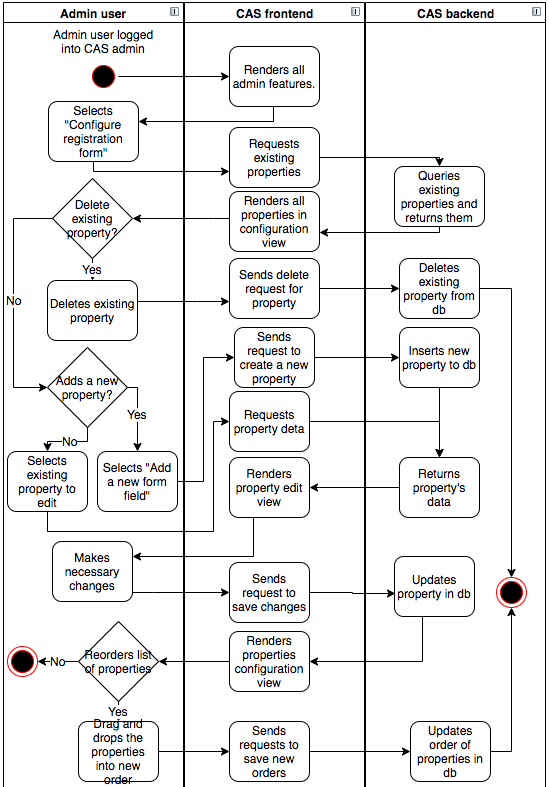
In the activity diagram here is shown that configuring CAS properties can be done by admin users.
There are four types of changes that admin can do with properties:
- Delete existing property - The admin user can delete existing property that does not have setting
deletableset as false. - Add new property - The admin user can add a new property for users to provide more specifications about themselves. When the admin clicks on the “Add a new form field” button a new property is created and the admin is redirected to the property edit view where he/she has to specify the settings for the new property he/she wishes to make.
- Edit existing property - The admin user can edit all existing properties except property
passwordproperty. - Change the order of properties - in the properties configuration view, the admin user can put the existing properties in the order he/she desires. This order is taken into account in the user registration and user edit views.