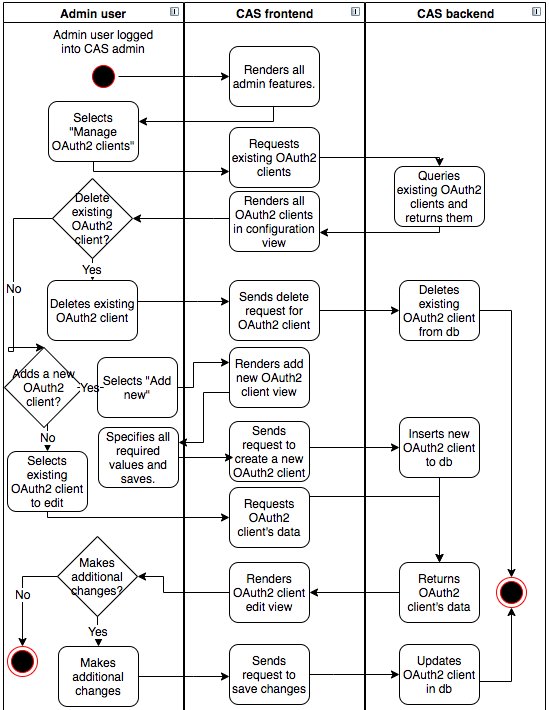
Logical component - OAuth2 client
The role of the OAuth2 client in the OAuth 2’s authorization framework is explained in this link: https://www.digitalocean.com/community/tutorials/an-introduction-to-oauth-2.
All web-systems that use CAS as their authentication service provider need to be registered as an OAuth2 client in CAS. Only after registration will the third-party system be given the credentials needed to create http requests which pass the CAS OAuth2 client validation. The credentials that are checked for every request are: client_id, secret and redirect_uri. Redirect_uri is the address where the user is sent after being authenticated. The CAS authentication processes will be entered only when CAS finds an OAuth2 client matching all of these values.
Additional settings for OAuth2 clients are.
client description- Data about the OAuth2 client. Information for database administrators.disabled- Setting which states that this OAuth2 client is currently not active.trusted- Setting which states that this OAuth2 client is trusted and CAS allows requests for creating users and changing user passwords.logo- Setting that stores the image of the OAuth2 client’s logo. This logo will be shown in the header of the login screen.
The activity diagram above shows that configuring CAS OAuth2 clients can be done by admin users.
There are three types of changes that admin can do with OAuth2 clients:
- Delete existing OAuth2 client - Admin can delete any existing OAuth2 client.
- Add new OAuth2 client - Admin can add a new OAuth2 client when a new third party system expresses a wish to start using CAS for authenticating its users. Admin has to specify three mandatory settings:
client_id,secretandredirect_uri. Other settings are optional. - Edit existing OAuth2 client - Admin user can edit all existing OAuth2 clients. A custom logo image can be set from OAuth2 editing view. Changing
client_idandsecretvalues can not be edited from this view.