Logical components
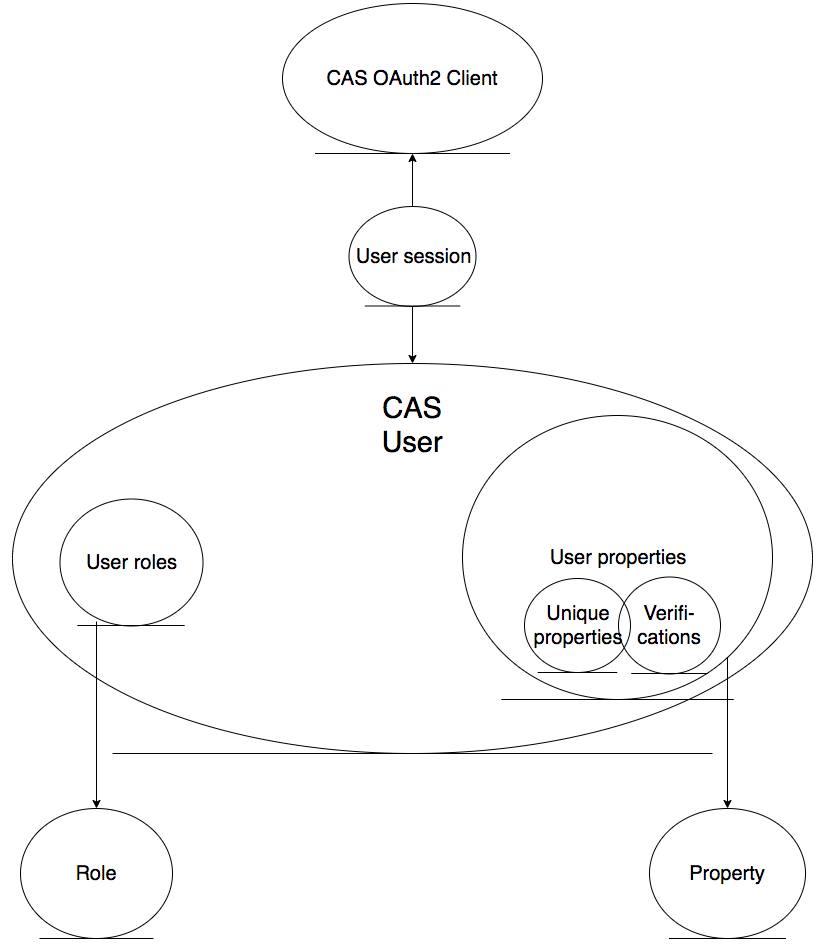
The image here shows the most important logical entities and the relations between them. In order for a web-system to use CAS as its authentication service provider the system needs to be configured as a CAS OAuth2 Client. Only after the system has been configured as the client can requests made from the system to CAS be approved and authentication features provided.
The CAS user is the resource owner who is registered in the CAS database. Each user has roles and properties.
The roles are predefined sets of privileges. The initial role the user is given is “Citizen”. All roles attached to a user are added to the user’s JWT access token when a session is made. The roles the user has are shown to the OAuth2 Client’s system the user wishes to enter.
Properties are a dynamic set of variables that define users. The admin user manages the list of properties which are used when a new user registers and also when a user edits his/her profile data. The values of properties can be unique or not. When a property is set as unique, other users cannot use the same value for it.
All properties can have verified values. When the value of a property is verified, it is specified in the token to show OAuth2 clients that it is not a self-declared value but has been verified by a Government official. Hence the client is certain the value is correct. For example, an email address is a verifiable property value. It is a user’s unique property. When the user clicks on the verification link sent to his/her email address, CAS verifies the value of the email.
A user session is the record of a user’s active login to a OAuth2 client at a given time. This contains a single-sign-on token so when the user enters another system that is also a CAS OAuth2 client he/she does not have to login again. This record is kept until it is no longer valid, or the user logs out from the system.